

On February 9, 2026, the pilot program for ChatGPT Ads launched, allowing early users to target subscribers to the USA Free and Go plans. The Self-Service Ads Manager (ChatGPT Ads dashboard) launched in May 2026, and international markets across 89 countries gained access in October of this year.
Have you thought about allocating some budget to try ChatGPT Ads? There is always some skepticism when a new ad platform is introduced. But once you learn about OpenAI’s unique approach, you may be willing to run test campaigns to evaluate reach, conversions, and results.
Understanding the Differences Between Google and ChatGPT Ads
Before I compare the differences and benefits of ChatGPT Ads, I want to be clear about my intent: in my opinion, one is not better than the other. Depending on your niche (product or service), you could gain a real competitive advantage by using both Google Ads and ChatGPT Ads. Each targets a different phase of the buyer-intent journey.
How Do Google Ads Work?
Google Search Ads are particularly effective at capturing existing demand. For example, if a consumer searches for “high-quality dog food near me” or “best organic dog food,” they have clearly expressed an interest in a specific product. No guesswork required.
Businesses running Google Search Ads compete for visibility when those searches occur. Ad placement depends on several factors, including keyword relevance, advertiser bids, ad quality, and competition within the product or service niche.
But what happens when someone clicks an advertisement, visits a website, and leaves without making a purchase?
That’s where remarketing can play an important role.
Google Ads allows advertisers to reconnect with previous website visitors through eligible remarketing campaigns. Depending on campaign settings, audience eligibility, and the advertiser’s sales cycle, these advertisements may continue appearing long after the initial interaction.
For an inexpensive product, a shorter remarketing window can make a lot of sense. However, businesses selling enterprise software, professional services, industrial equipment, or other high-consideration products may benefit from longer remarketing strategies.
Advertisers aim to stay visible while prospective customers evaluate options and move closer to a purchase decision. Of course, there is a balance. Excessive advertising can create ad fatigue, potentially frustrating the very customers a business is trying to attract.
💡 The key takeaway? Google Search Ads help businesses capture existing demand, while remarketing can help maintain brand awareness throughout a longer buying journey.
What is the Average Duration of a Google Ads Campaign?
There is no true average campaign length because it varies by product or service, the advertiser’s conversion cycle, and overall marketing strategy.
Many advertisers choose an initial 60–90-day testing period for Google Ads campaigns. This gives automated bidding strategies time to gather performance data, campaigns time to optimize, and meaningful conversion trends time to emerge.
However, campaign duration and remarketing audience duration are different.
Google Ads allows businesses to create remarketing audiences based on previous website interactions. Depending on the campaign type and audience settings, remarketing membership can extend up to 540 days.
A longer remarketing strategy can be particularly effective for products and services with complex purchasing decisions or extended sales cycles, where businesses want to stay top-of-mind until a prospect is ready to buy.
Examples include:
- Professional corporate services
- Heavy equipment and industrial machinery
- Enterprise software
- Real estate
- Higher education
- Luxury goods
Cyclical services, such as annual tax preparation or accounting, and major events, including concerts, film and music festivals, and seasonal resorts (think Austin City Limits — ACL), may also benefit from carefully timed advertising campaigns that build awareness and encourage advance purchases.
How Do ChatGPT Ads Work?
Advertising with ChatGPT works differently. Rather than relying on isolated search queries (think search strings and keywords), ChatGPT applies a deeper context. People comfortable using ChatGPT for personal use also research products and services with AI.
Let’s say you are a small business owner providing marketing services. You may be researching topics on ChatGPT that include:
- Networking events
- Lead magnet and nurture strategies
- Email automation software
- Affordable CRM platforms
- High-authority business directory listings (yes, they still work and AI loves to cite them!)
- High-interest blog topics (like this one)
- Competitive price analysis data
While you are researching these topics, ChatGPT’s advertising system can consider the context of your current conversation, identifying challenges you may be facing, your immediate priorities, and solutions you are actively considering.
If you’ve enabled personalized advertising, additional signals from your broader ChatGPT experience may also influence which advertisements appear.
Sounds very much like Google Ads, right? The difference is that the connection is conversational, rather than driven primarily by individual keywords or search terms.
The advertising system considers several factors, including:
- The intent and subject of the current conversation.
- The advertiser’s products, services, and landing page.
- Ad headlines, descriptions, and contextual targeting hints.
- Advertiser bids and expected relevance.
- Additional personalization signals when enabled.
The conversations you’re having with AI can bring your needs into focus, allowing ChatGPT to display relevant advertisements for products or services you may be interested in.
What’s particularly interesting is that these ads may appear earlier in the buying journey, when you haven’t even defined exactly what you’re looking for in direct terms.
Can Advertisers Sponsor ChatGPT Search or Conversational Responses?
Wouldn’t that be a scary thing? Thankfully, OpenAI has created a wall between paid advertisements and the responses ChatGPT generates. Advertisers cannot pay to influence ChatGPT’s answers, and sponsored content is clearly labeled and displayed separately from organic responses.
Advertisers also don’t get access to your private conversations, your chat history, or your personally identifying information. Instead, they receive aggregated performance data to help evaluate their advertising campaigns.
Individuals using the Free and Go plans can also customize their ad preferences, including disabling personalized advertising or hiding ads they consider irrelevant.
This separation between paid advertising and independent AI-generated responses is important. It helps maintain consumer confidence in an environment where people increasingly rely on AI for research, recommendations, and purchasing decisions.

If you want to see the ChatGPT ads in action, and you already have a paid plan, create a free account and buckle up. Like other ad platforms, ChatGPT will offer deals to new advertisers. Until November 17, 2026, if you spend $500 on ChatGPT Ads, you will receive an additional $500 in ad spend.
Ready to Try It Out? Setting Up Your ChatGPT Ads Account
💡 Creating your new ChatGPT Ads account is easy. Get started by visiting the OpenAI Ads Manager website. You can manually create an account with new credentials or log in with an existing OpenAI account.
1. Complete Your Business Profile
This is a standard advertising account setup that requires you to enter your business name and website URL. You will also be prompted to upload your business logo.
2. Create Your First Ad During Signup (or Skip Ad Creation)
OpenAI lets you preview what an ad would look like during signup. Enter your website URL, and the platform will generate an ad preview.
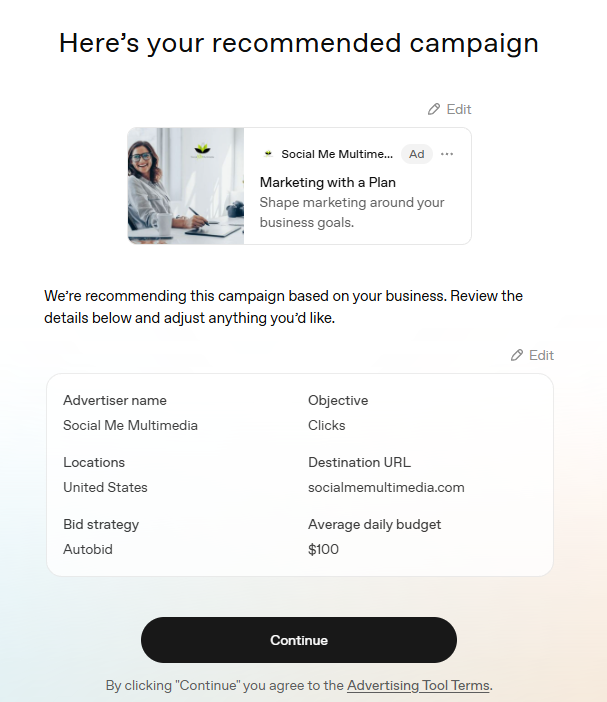
If you are not interested in seeing a quick preview, you can skip this step. I was curious!
The format provides basic information, similar to a Google Ad, including the advertiser’s name, headline (title), descriptive content, thumbnail image, and target landing page URL.
3. Update Account Settings
Take your time at this part of your ChatGPT Ads Manager account setup. Some settings, including your geographic location (country), payment currency (i.e., USD), and time zone, cannot be changed once your account is created.
Review your account details carefully before proceeding.
4. Set Up Billing Details
Provide any required business tax information, such as an EIN or Tax ID, and add your payment method. Requirements may vary by business location.
If you are exploring the ChatGPT Ads Manager dashboard and aren’t ready to place any ad spend, you can skip this part until you’re ready to allocate a budget.
5. Create Conversion Tracking
On the right-side menu, click on Tools and select Conversions. Here is where you can configure conversion tracking to measure results from your advertising campaigns.
OpenAI supports website conversion tracking through the OpenAI Pixel and Conversions API.
If you’re already using website analytics and conversion tracking, take time to review how ChatGPT Ads fits into your existing measurement strategy.
After all, generating clicks is one thing. Understanding whether those clicks convert into qualified leads or customers is what really matters!
Is ChatGPT Advertising Right for Your Business?
ChatGPT Ads offers another opportunity for businesses to connect with potential customers, especially as more consumers use AI to research products, compare services, and make purchasing decisions.
Does that mean you should immediately shift your Google Ads budget to ChatGPT? Absolutely not. But if you’re looking for new ways to expand brand visibility, reach qualified prospects, and diversify your digital marketing strategy, ChatGPT Ads may be worth exploring.
💡 Start with a modest testing budget, monitor your conversion data, and evaluate whether the channel delivers meaningful results for your business.
Have you started advertising on ChatGPT? I’d love to hear about your experience. Share your observations in the comments below.
